Banner

How Can We Help?

With a team of experienced staff, we are confident to bring the most professional service to customers.

Phaata.com HOW IT WORKS ?

Post “HOT” Services

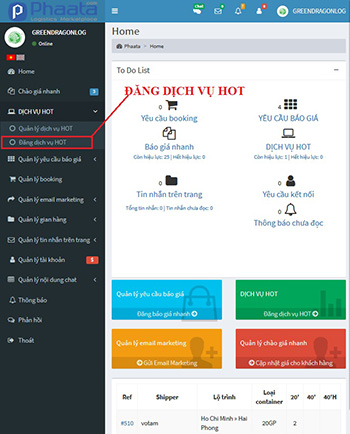
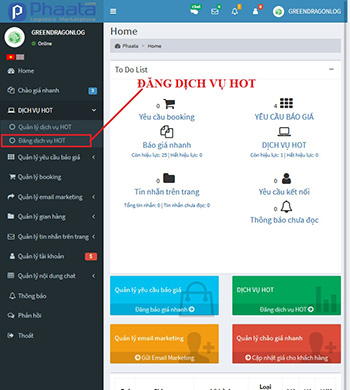
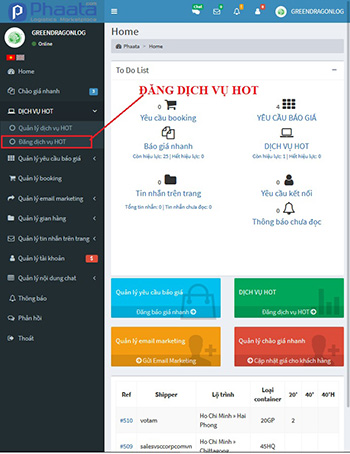
Step 1: On your dashboard, select “HOT service / Post HOT service” - https://user.phaata.com/
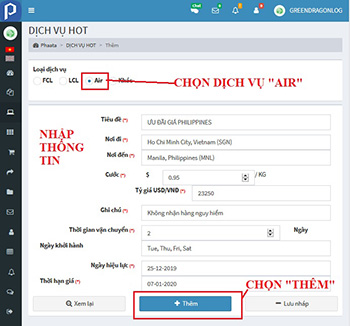
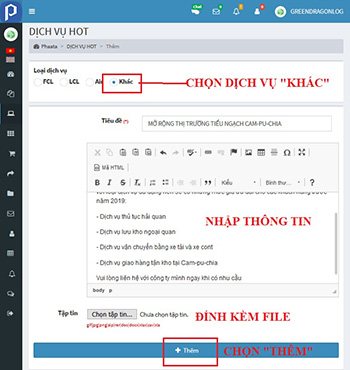
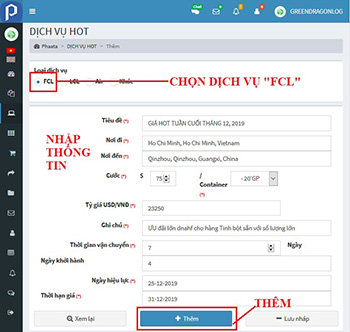
Step 2: Select FCL Service and input information in field, especially the fields (*) and then click "Post"
Step 3: successful posting notices appear on the screen  

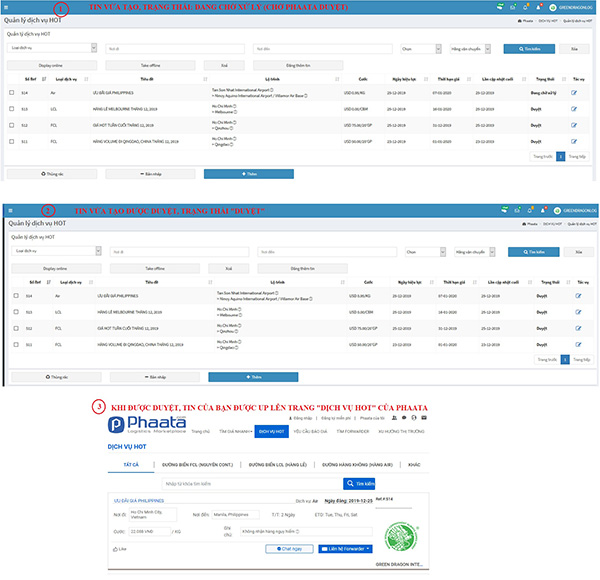
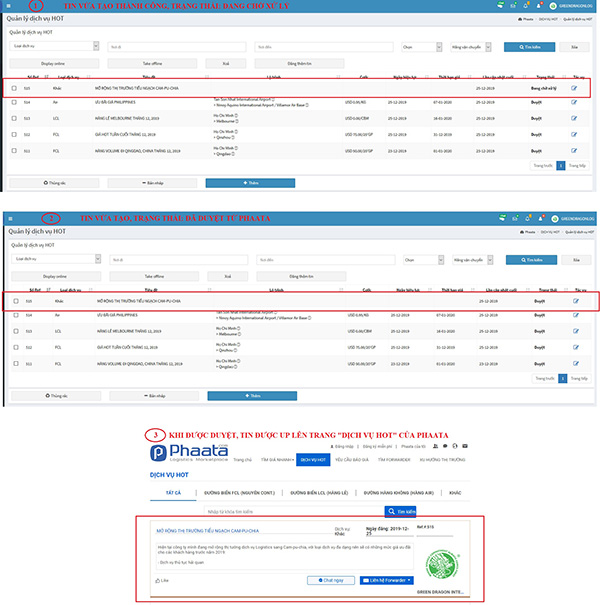
Step 4: To view the HOT service FCL news just post, select "HOT service > Manager HOT service" - https://user.phaata.com/user/requestadd

  • HOT Service News that you just created has status "Pending approval" by Phaata
  • After approval, status is "Approved"
  • And HOT Service news wll be appear on Home
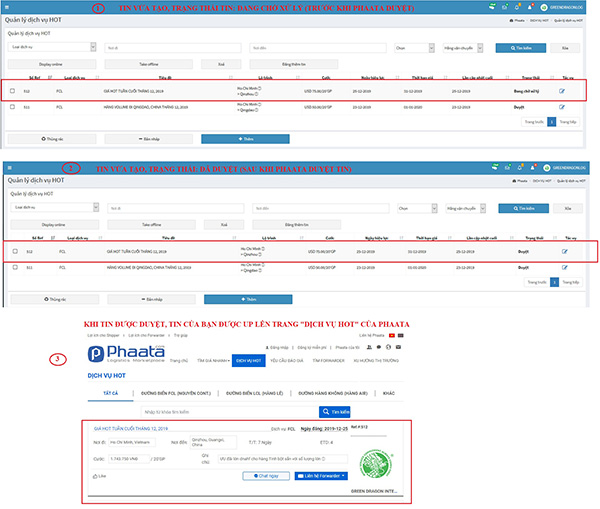
Step 1: On your dashboard, select “HOT service / Post HOT service” - https://user.phaata.com/

Step 2: Select LCL Service and input information in field, especially the fields (*) and then click "Post"

Step 3: Successful posting notices appear on the screen 

Step 4: To view the HOT service FCL news just post, select "HOT service > Manager HOT service" - https://user.phaata.com/user/requestadd

  • HOT Service News that you just created has status "Pending approval" by Phaata
  • After approval, status is "Approved"
  • And HOT Service news wll be appear on Home
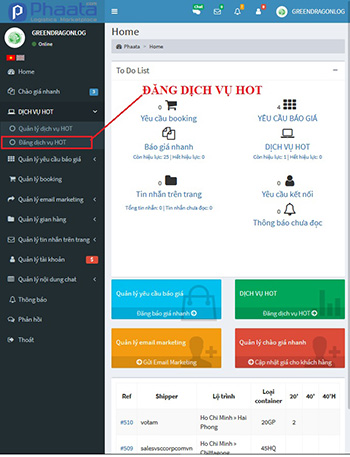
Step 1: On your dashboard, select “HOT service / Post HOT service” - https://user.phaata.com

Step 2: Select LCL Service and input information in field, especially the fields (*) and then click "Post"

Step 3: Successful posting notices appear on the screen 

Step 4: To view the HOT service AIR news just post, select "HOT service > Manager HOT service" - https://user.phaata.com/user/requestadd

  • HOT Service News that you just created has status "Pending approval" by Phaata
  • After approval, status is "Approved"
  • And HOT Service news wll be appear on Home
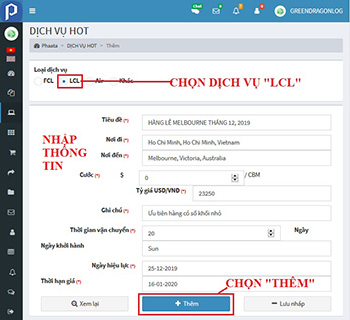
Step 1: On your dashboard, select “HOT service / Post HOT service” - https://user.phaata.com

Step 2: Select LCL Service and input information in field, especially the fields (*) and then click "Post"

Step 3: Successful posting notices appear on the screen 

Step 4:To view the HOT service AIR news just post, select "HOT service > Manager HOT service" - https://user.phaata.com/user/requestadd

  • HOT Service News that you just created has status "Pending approval" by Phaata
  • After approval, status is "Approved"
  • And HOT Service news wll be appear on Home
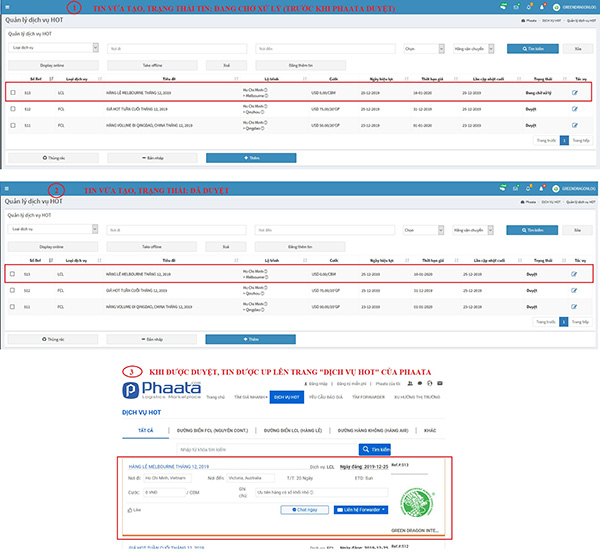
This page will help you to Management and marketing HOT Service faster and effectiver by access link: https://user.phaata.com/user/requestadd:

  • Remove post HOT service news by: "Take offline"
  • Repost HOT service news by: “Display online”
  • Delete your HOT service news on system by: “Delete”
  • Post new HOT service by: “Add new”
  • Copy post news by: "Edit" 

Freight rates

Help you find instant freight rates with just a few clicks.

See more

Request For Quotes

Help you send and receive quotes from Forwarders on the market quickly and efficiently.

See more

HOT Services

Help you quickly find Hot services being promoted on the market.

See more

Find Forwarders

Helps you easily find and choose the most suitable logistics service provider

See more

Warehouse

Helps you easily find and choose the most suitable logistics service provider

See more