
 SEA
SEA
 AIR
AIR
 RAIL
RAIL
 ROAD
ROAD
 COSCO
COSCO
 SITC
SITC
 PACIFIC LINES

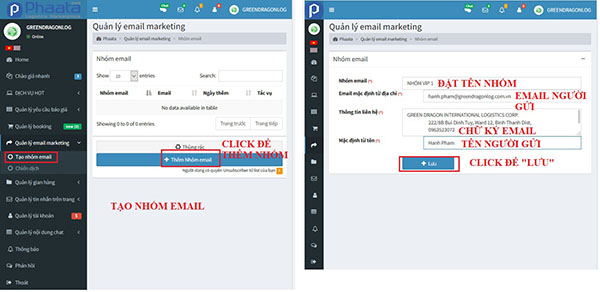
Step 1: On your dashboard - https://user.phaata.com/user/marketing
- Select “Email marketing / Create marketing list"
- Select "Add email group"
- Input information:
- “Email group”: Name email group customer
- “Default email from ID”: transactional email with your customer
- “Contact information”:email signature
- “Default name”: your name
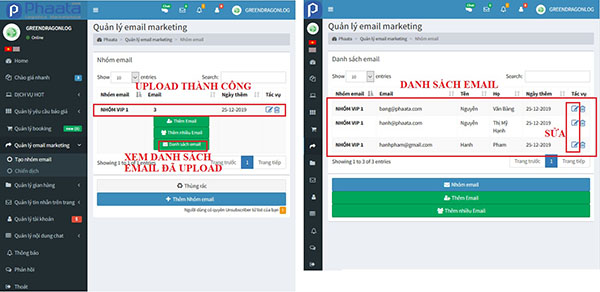
Step 2: Add each email to the group by selecting "Add email / Input required email information / Save"
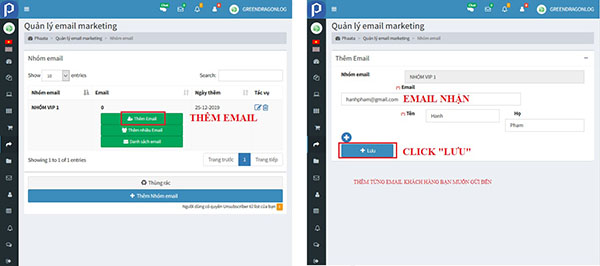
successful posting notices appear on the screen 
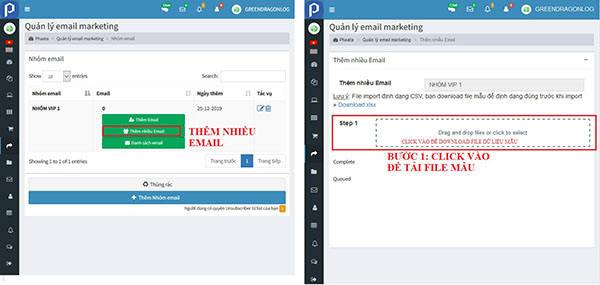
Step 3: Add multiple emails by selecting "Add multiple emails / Download email import form data file"
- Click on Step1 to download file
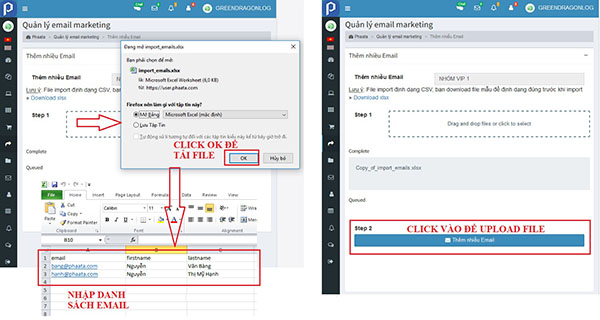
- Input the email list you need for the email group and click "Add more emails" in Step 2 to upload the file.
- Note: You must maintain the column and field format of the file to ensure normalization of data
Step 4: successful posting notices appear on the screen
- Click "Email list" to view email customer in group
- Click
 to edit.